
Put a record on your desktop.
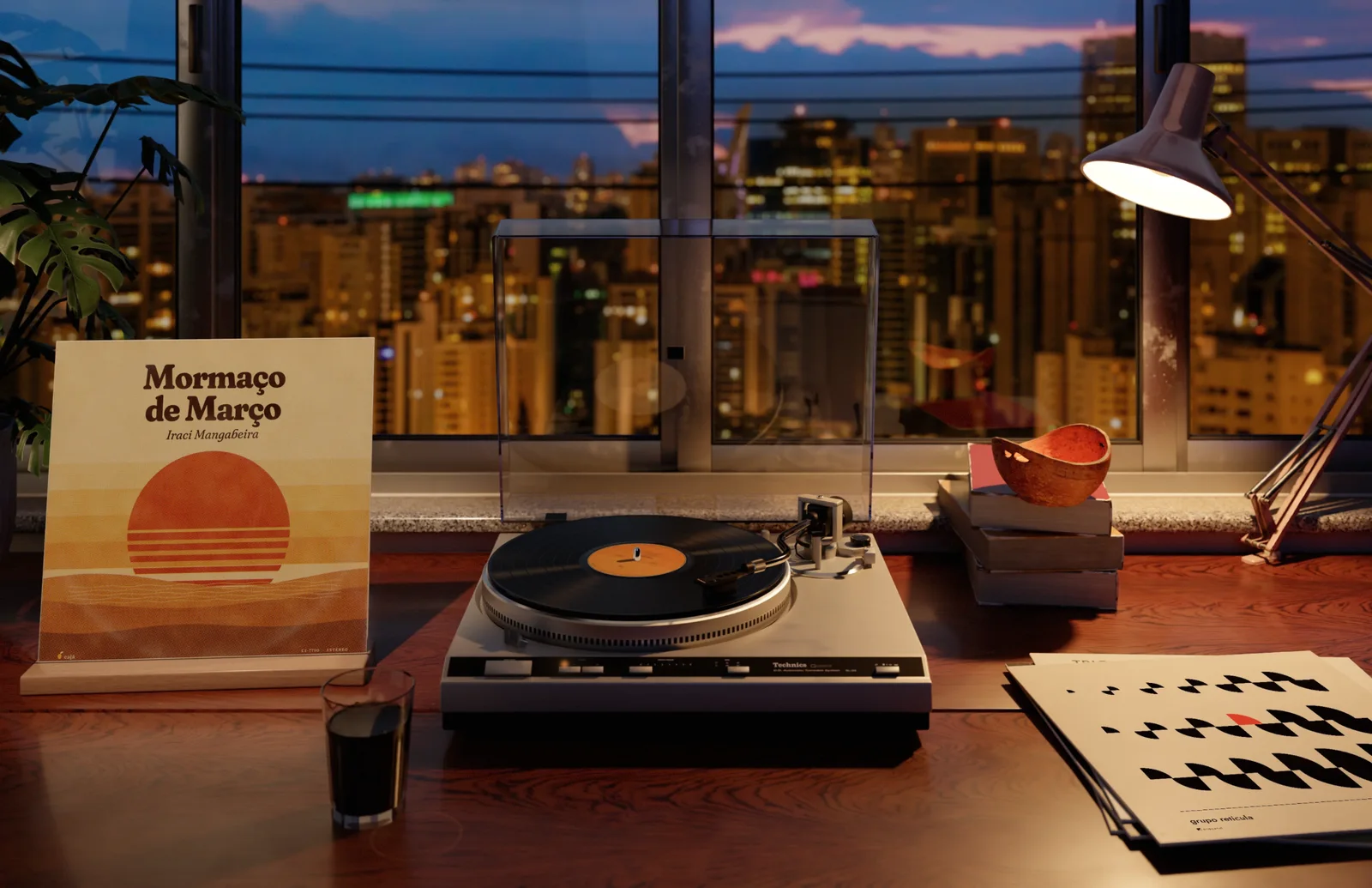
I have a 1979 Technics SL-Q3 on my desk in São Paulo. Vitrola puts it on your Mac, as your wallpaper. Hit play in Spotify or Apple Music and the arm drops onto the record.
Vitrola is a Mac app. Open getvitrola.com on your Mac to try it, or buy it here.
A Technics SL-Q3, down to the dust.
I modeled the 1979 direct-drive automatic part by part, from the original service manual: the 312 mm platter with its strobe dots, the S-shaped arm, the cue lever, the smoked acrylic lid.
Then I gave it forty years of use. Dust in the mat grooves, fine swirl marks on the platter rim, the start/stop print worn where a thumb kept pressing it.
It moves like one, too. The platter gets up to 33⅓ in 0.7 seconds. The arm lifts, swings over to the lead-in and comes down slowly on the cue.
You hit play. It spins.
Vitrola follows Spotify and Apple Music on your Mac. Change albums and the cover on the stand fades to the new one, label included.
Each song gets its own band of grooves on the record, and the needle sits on the one that's playing. Skip a song and the arm lifts and lands on the right band.
Pick a track
São Paulo, through the window.
The room runs on your clock: a hazy morning over downtown, blue sky over Pinheiros at noon, gold around five, the city lit up after eight. The light moves with the day instead of jumping between four photos.
If it's raining in São Paulo, it rains on your window. The app checks the city's weather and runs drops down the glass. The coffee keeps steaming either way.
Light enough to leave on.
Vitrola isn't a video loop. I rendered the room's light once, offline, in Cycles. On your Mac it only redraws what moves: the label, the arm, the steam.
The record on top of the pile is the last album you played.
- CPU while a record plays
- ~0%
- CPU while a record plays
- when windows cover it
- 0%
- when windows cover it
- locked to the quartz, like the real one
- 0⅓ rpm
- locked to the quartz, like the real one
Now in 1.0.10
A real record, down to the needle.
Vitrola cuts the record from the tracks you're actually playing.
- The needle is where the song is
- Calibrated at the cartridge's tip, it walks through the band as the song plays. Skip a track and the arm lifts and lands on the right one. Flipping sides and changing albums have their own moves.
- Real LP geometry
- Each band is as wide as its song is long, about 26 minutes per side. What's left becomes the smooth run-out, and at the end of the side the automatic arm lifts. A long album becomes a double LP, sides A to D. A single plays at 45 with the 45 light on.
- The right track list
- With Apple Music it comes from your library, offline. Searching Apple's catalog is optional and off by default.
- Rain when it rains
- Automatic from the forecast, always on (drizzle, rain or heavy), or off.
Each band is as wide as its song is long.
On a real Mac.
Recorded straight from the app, with the windows out of the way.
4 framings, the whole day
Four ways to frame it.
Pick the shot that fits your screen. Each one goes through the whole day.
The whole room, window and all.
Pay what you want.
The minimum is $4.99R$24.90, paid once. Every price gets the whole app. Paying more helps me keep making things like this.
Launch minimum· until October 27, then from $6.99R$34.90
from$4.99R$24.90
Suggested $7.99R$39.90. One-time payment, no subscription.
Vitrola is a Mac app. Open getvitrola.com on your Mac to try it, or buy it here.
Requires macOS 14 Sonoma or later. Not for you? Full refund within 14 days.
- 7 days
- free trial, no card
- 2 Macs
- per license
- Once
- no subscription
- 14 days
- to ask for a full refund
- Works with Spotify and Apple Music
- 4 framings, with light through the whole day
- São Paulo's weather on your window
- Free updates through version 1
Questions
Contact: matheus@onezi.com.br
That's the honest limit: it lives behind your windows. It shines on a second display, on an empty desktop or another Space, and in the moments you swipe to the desktop between tasks. When windows cover it, it stops drawing. If you live in fullscreen apps, use the 7-day trial before paying.
About 3% CPU while a record plays, and 0% when windows cover the desktop, because it stops drawing. Memory is the weak spot: around 420 MB today, since the room's light is kept ready as textures. Bringing it down is the main job for 1.1.
The Spotify app and Apple Music, on your Mac. Browsers, YouTube Music, Tidal and other players aren't read yet. No login needed: macOS asks you once to allow it. With nothing playing, the room and the light keep running.
It's a universal app, so it installs and opens on Intel. But I've only tested it on Apple Silicon (M1 and later). Try it free first. If you already paid and it doesn't run well, the 14-day refund covers it.
The App Store sandbox doesn't let an app read what Spotify and Music are playing, and it has no pay what you want. So I sell it directly, through Gumroad.
Download it and use everything for 7 days, no card and no account. If it earns a spot on your desktop, buy a license. If not, just delete it.
You type the price at checkout, from $4.99R$24.90 (until October 27; after that, from $6.99R$34.90). Every price gets the same app and the same license. Paying more just helps me keep going.
One license covers 2 of your Macs, like a laptop and a desktop. You can move it to another Mac from the app's settings.
No. You keep playing music in Spotify or Apple Music, and Vitrola shows the record spinning. When nothing is playing, the arm goes back to its rest and the platter stops.
By default, nothing about what you play leaves your Mac, except the Spotify cover, which comes from Spotify's own servers. There's no account and no login. The app goes online only to start the trial or activate your license, download the room, check for updates, check São Paulo's weather and load those covers. The details are on the privacy page.
Yes. If it isn't for you, email matheus@onezi.com.br within 14 days of buying and you get your money back.